Introducing Metric Sprint: speed and agility testing without timing gates
Metric Sprint times sprints and agility tests from one iPhone or iPad on a tripod. Automatic starts, splits, peak velocity, stride-by-stride analysis, sprint mechanics, and video of every run, with no timing gates, lasers, or chips.
Introducing Metric Sprint, the third performance app from Metric. It times your sprints and agility tests from a single phone or iPad on a tripod. No timing gates, laser beams, or Freelap chips required. There is no kit to pair, charge, or carry out to the field.
Set up a few cones, stand your phone side-on to the lane, and run. Metric Sprint finds you on the start line, starts the clock on your first movement, and times every split on its own. Metric Sprint is fully automatic: no manual frame labelling and no waiting on cloud processing, because every frame is analysed on your device. It tracks the athlete from the moment they touch the start line. Plus, you get video playback, frame-by-frame velocity, biomechanics, and stride analysis in real time, right on your phone.
Then it goes further than any set of gates can. Metric Sprint follows you through every frame of the run, so one rep gives you:
- Split times at every cone, from 5 m out to 30 m
- Peak velocity, and exactly where in the run you hit it
- An acceleration curve for the whole sprint, start to finish
- Stride-by-stride analysis: stride length, cadence, ground contact time, and flight time
- Sprint mechanics: shin angle, trunk angle, and thigh lift on every stride
- Video of every run, with the analysis drawn on top
- Personal records for every split and test, tracked automatically
Agility gets the same treatment. Six tests, including the 5-0-5, 5-10-5, and T-Test, each with every turn checked against the line.

The problem with sprint timing gates
For years we ran a gym in Melbourne, and we tested a lot of athletes. Speed testing was always the most expensive, stressful, and logistically challenging part of testing to set up and manage.
We cared so much about speed and agility (change of direction) testing that we built our own custom timing gates, complete with 3D-designed and 3D-printed cases. They sent every result straight into the athlete testing database we’d built for the gym, and they cost less than buying a commercial system. They were, however, a constant job. Gates needed maintaining. Connections dropped, on ours and on the commercial systems we tried. Batteries ran flat at the worst moments. None of it was hard, exactly. It just made coaching and running testing events trickier than it needed to be.
Accurately catching the start is the other big problem. With gates, the clock starts when something breaks the first beam. Where an athlete puts their arms, how far they lean or rock back, and whether a hand swings through the beam before the body moves can all change the sprint time by enough to affect the result. Coaches spend half the session adjusting start positions, and you still can’t be sure two athletes were timed in exactly the same way.
And however good the gates are, whether they’re custom like ours, Freelap, or a VALD system, they share one limit. They only know when something crosses each line. Everything that happens between the split lines is hidden.
When we decided earlier this year to add more testing to Metric, sprinting stood out as the obvious place our computer vision systems could be applied. It’s one of the most useful test categories in sport, and one of the most painful to run well. So we built Metric Sprint on the same patented computer vision system behind Metric Lift and Metric Jump, turned the phone landscape, and pointed it at a running lane.
When we posted the first short clip of it on Instagram, it popped! It reached more than 300,000 people in the first two days, by far our most popular social post of all time. Our guess was correct: a lot of coaches and athletes are running into the same frustrations and hurdles when trying to accurately measure sprinting speed.
How to time your sprints without timing gates
With Metric Sprint, you can be fully set up and ready to sprint in under two minutes. Here’s what a session looks like.
- Measure your track and put a cone at each distance (split) you want to time.
- Stand your phone on a tripod, side-on to the lane, about chest height.
- Select your sprint distance and splits, or agility test protocol.
- Drag the on-screen gates onto your cones. Line them up with the cones closest to the camera, and Metric handles the far cones automatically.
- Tap Start and walk to the line. You can run whenever you are ready.
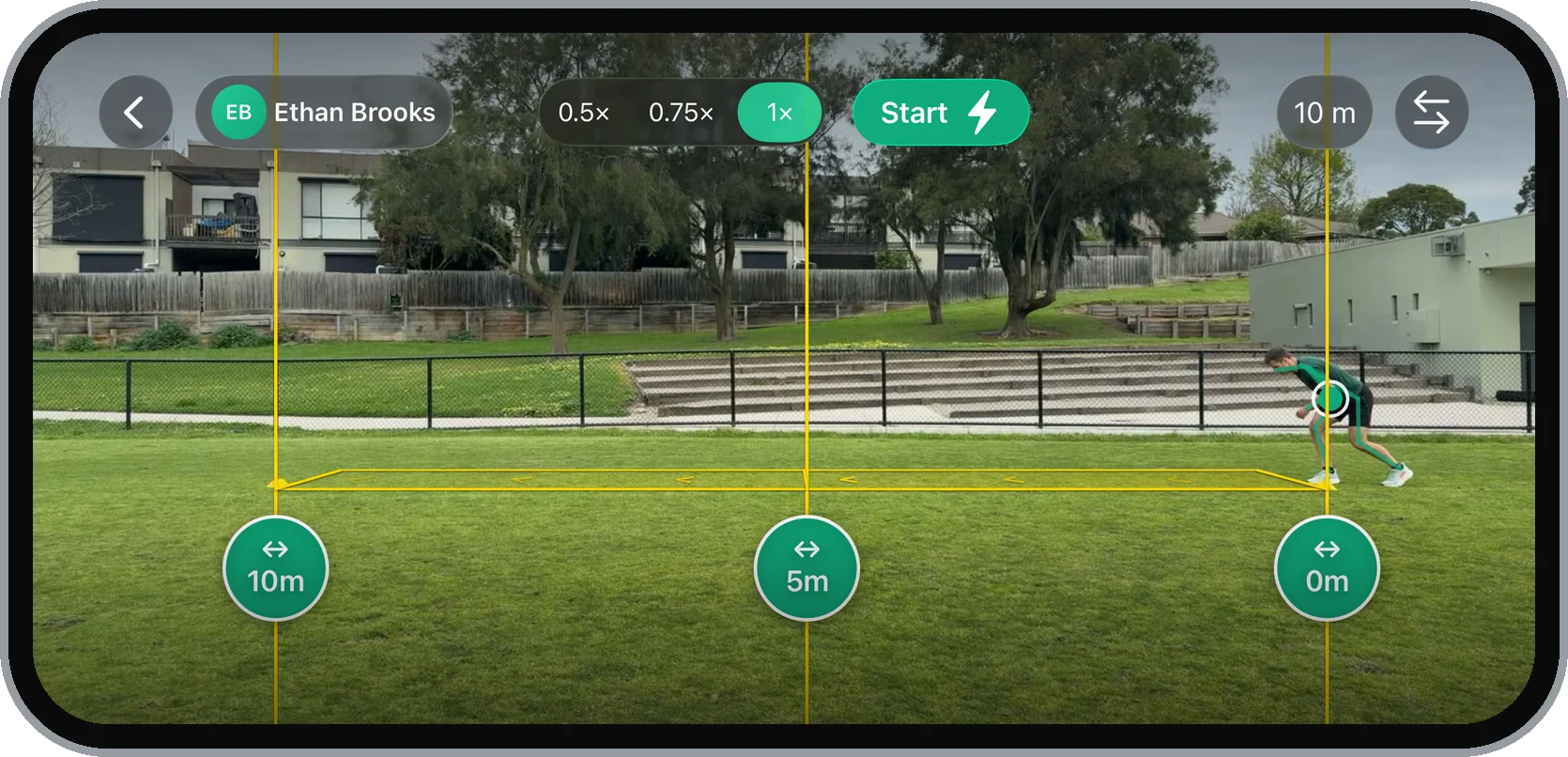

Metric Sprint finds you, waits until you’re standing still at 0 m, and arms the run. Then you go whenever you’re ready. The clock starts on your first forward movement off the start line, not when a hand or a shoulder crosses a beam. You can start in whatever stance you’d naturally sprint from, and every athlete gets timed from the same moment of forward movement. You can test with a coach running the app on a device, or on your own, too.
The app records at 60 frames per second and tracks your body in every single frame. It runs on iPhone and iPad with iOS 26.1 or newer.
Splits are filed by distance, not by test. The first 10 m of a 30 m run counts towards the same 10 m record as a standalone 10 m sprint, so you can change your test from week to week and your split history and progress will continue to build. Tick 10 m and 20 m on a 30 m run and you also get a flying 10 m, the fastest 10 m you ran already at speed.
The recording guide covers camera position, light, and framing in more detail.
As of version 2.1, you can also record flying sprints. You build up speed over a lead-in before the start cone, Metric finds you in motion, and it tracks you through the 10 m or 20 m flying section, so you can analyse your top-speed mechanics too.
Splits, peak velocity, and strides: your sprint summary
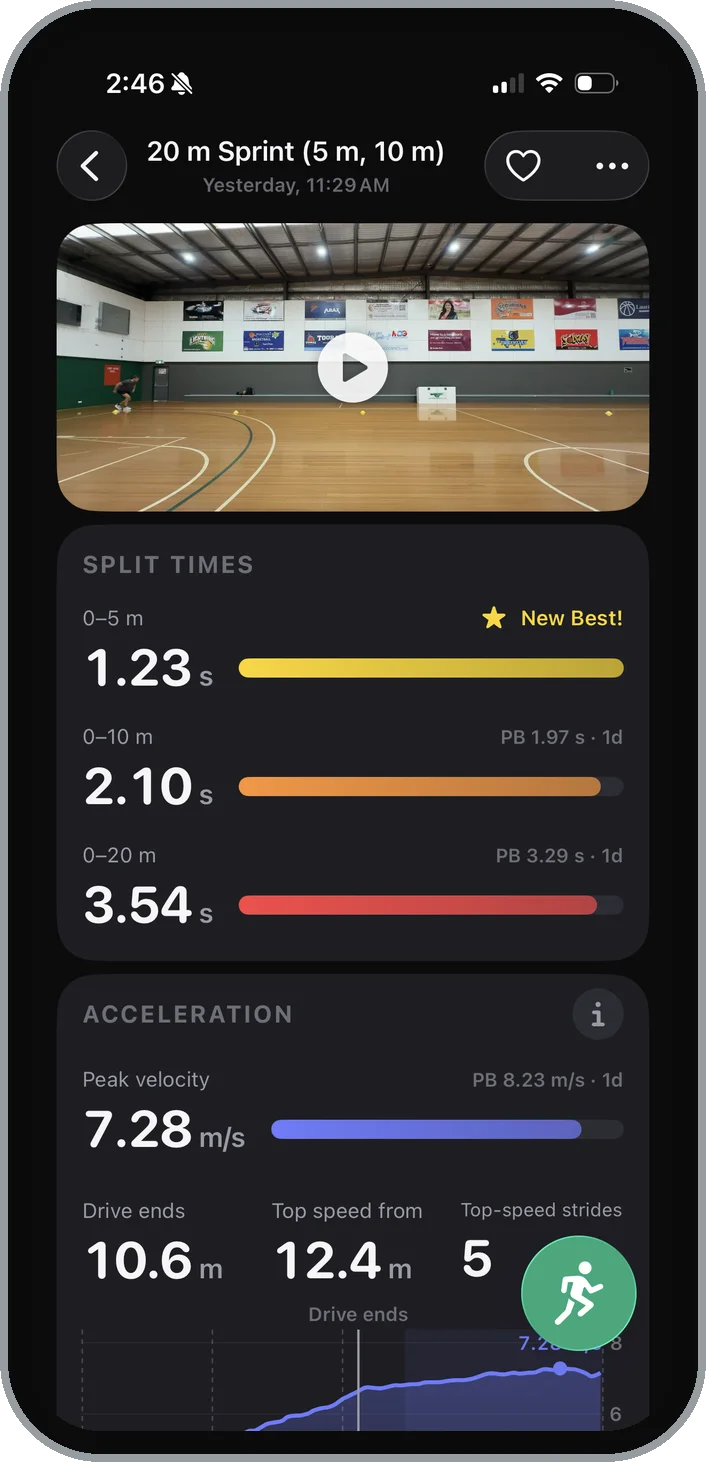
Here’s what a sprint summary looks like from the inside. This example is mine, from a session on an indoor basketball court.
I’m 35, and I’m not, nor have I ever been, a sprinter. So when I started running hard sprints again to test the app, I wasn’t expecting much. My times have already come down, though, thanks to the accountability of Metric’s data. I’m hoping to crack 3.20 s over 20 m and a 9 m/s top speed soon.
Split timing
1.23 s to 5 m, 2.10 s to 10 m, 3.54 s at the finish. Each one has a bar showing how close it came to my best for that distance. Metric lets you set any splits you like, from 5 m to 30 m.
Sprinting velocity
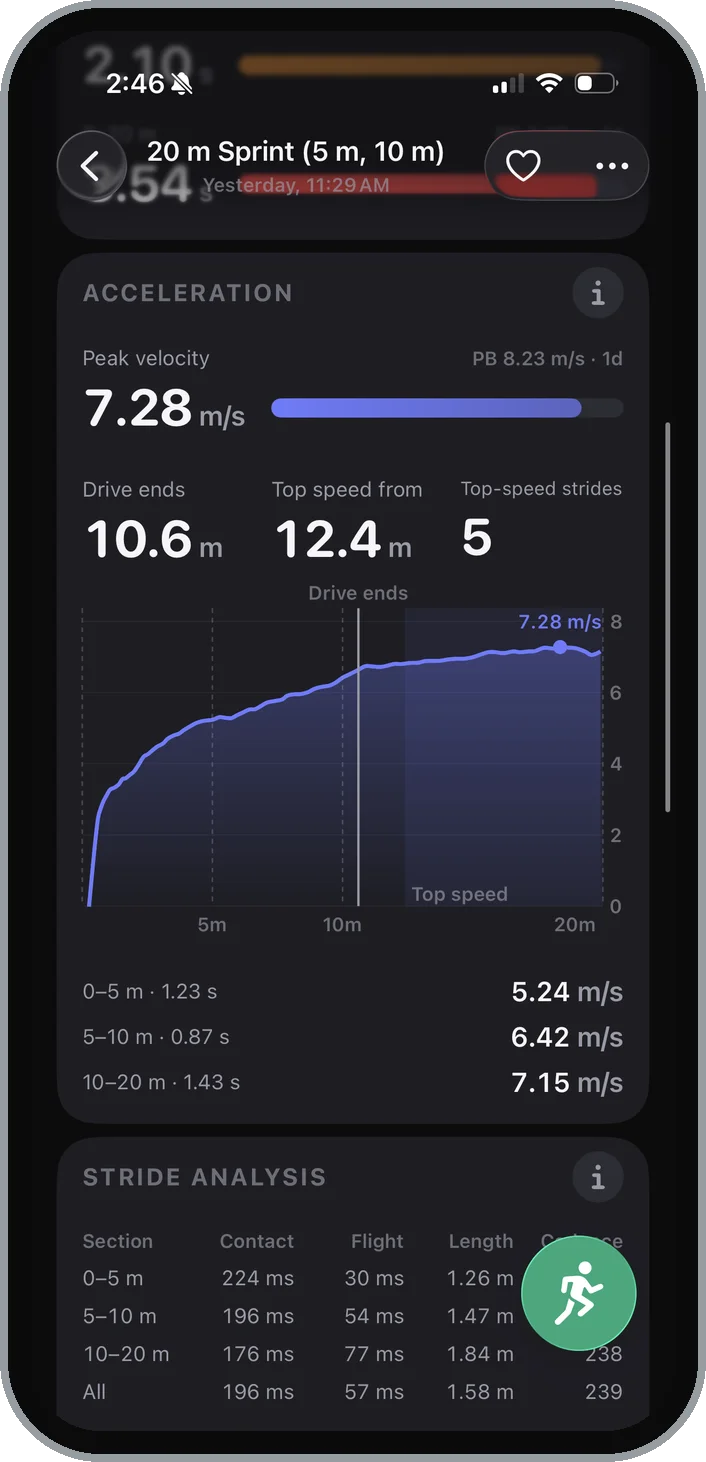
My peak velocity was 7.28 m/s, at the 19 m mark. A set of gates can’t give you that number. Gates measure the average speed between two beams, so the fastest moment of the run disappears inside the average. Metric Sprint tracks your body in every frame and every stride. The curve showed my speed climbing hard over the first 5 m and rising right up to the last metre. The acceleration card also marks where my drive phase ended, at 10.6 m, and where my top speed began, at 12.4 m.
Stride analysis
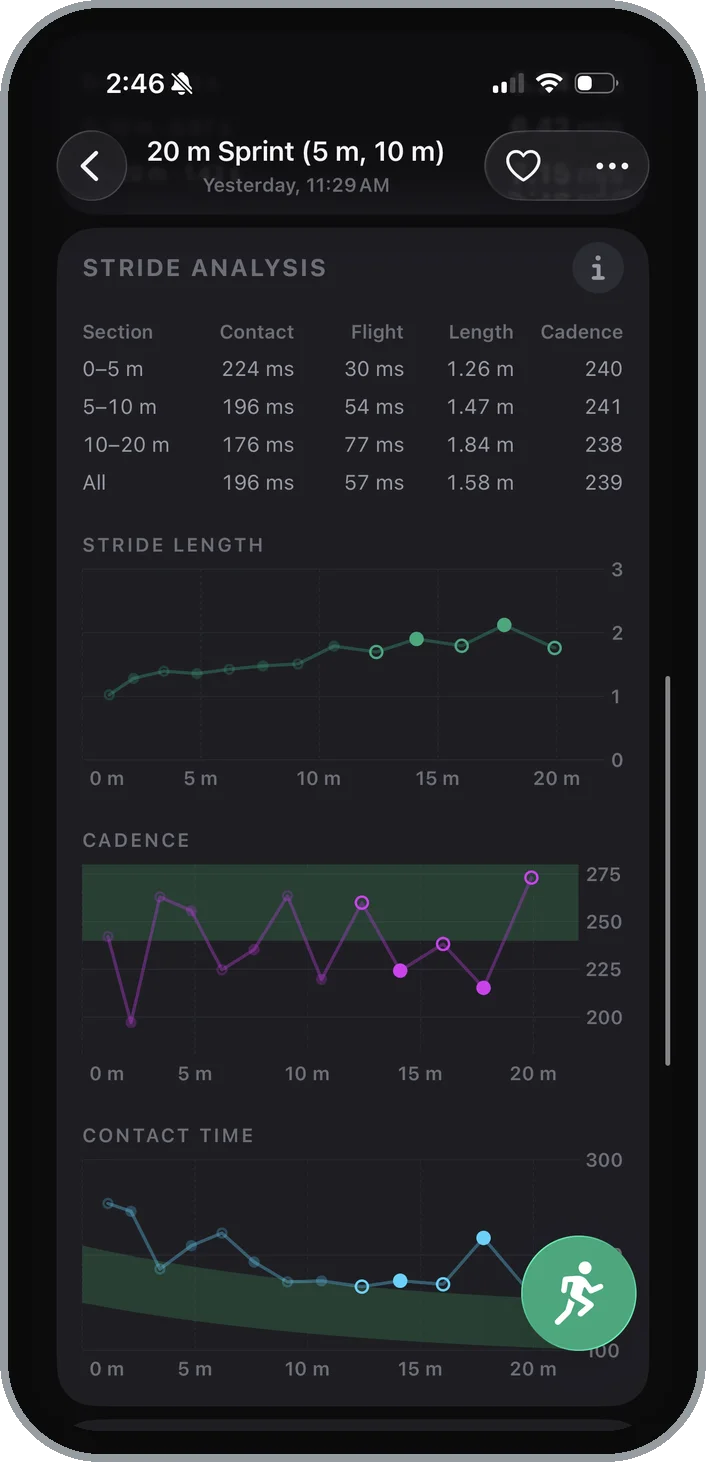
This is where it got interesting. Metric Sprint splits the run into sections and shows how each one was built. My ground contact time dropped from 224 milliseconds over the first 5 m to 176 over the last 10 m. Stride length went from 1.26 m up to 1.84 m. That’s what a decent acceleration should look like: as you speed up, each foot spends less time on the ground and each stride covers more distance.
Sprinting biomechanics
The sprint mechanics card backed it up. My shin angle at touchdown kept climbing past vertical as I got faster, which is what a foot reaching out in front looks like. The same card charts thigh lift, how high the knee comes through on every stride, against a target band. Version 2.2 adds trunk angle to the sprint mechanics card too, which wasn’t there when I ran this session.
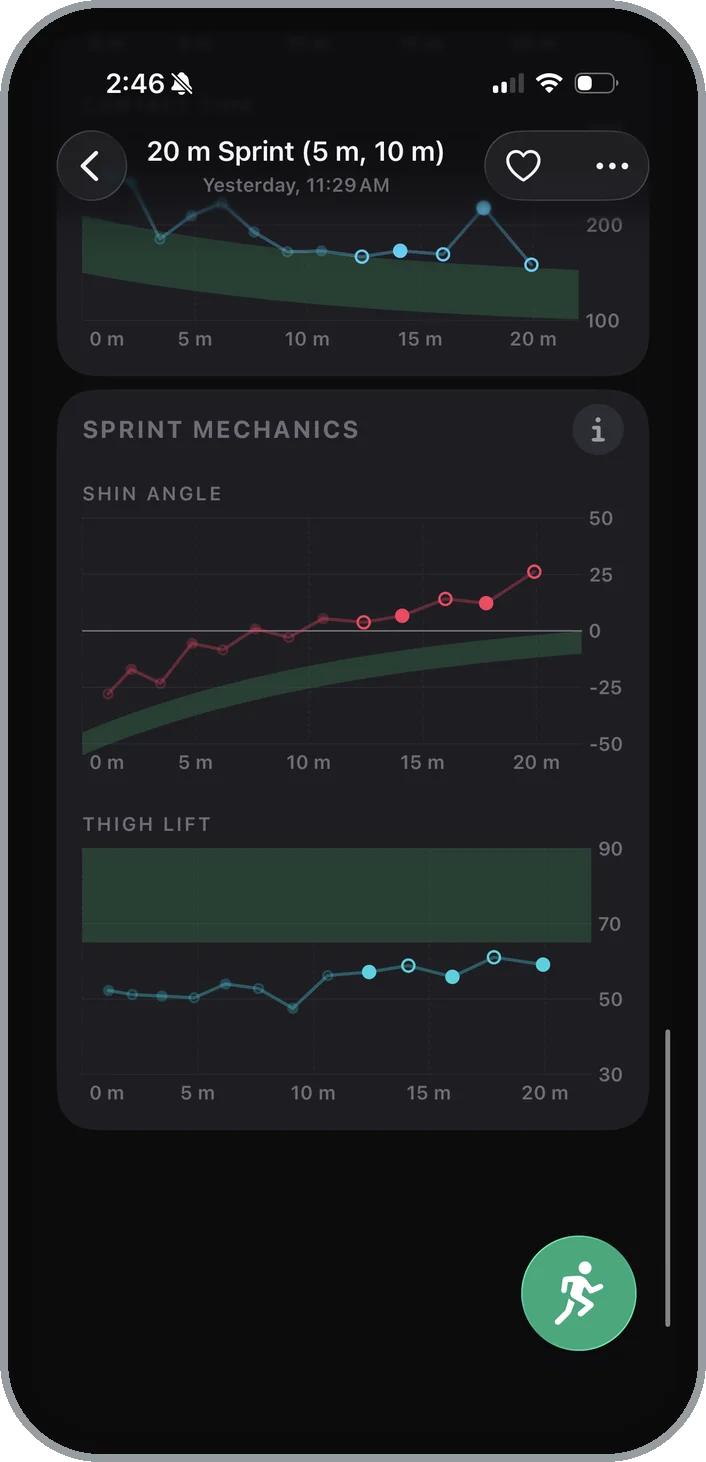
On all these analysis charts, you can see I’m just outside the ideal green zone for most metrics. The green range shows what a high-level sprinter does over a sprint of the same distance, which gives you a reference point and an easy way to spot your strengths and weaknesses. I’m overreaching for the ground at top speed, with my shin angled out in front of my body, and that adds braking to every step. A gate would have told me 3.54 and nothing else. Metric Sprint shows me what’s going well, what needs work, and how to fix it in the future. The sprint data guide explains each card, with what good looks like and what to train when it isn’t there yet.
Sprint video analysis and playback

This video shows the same 20 m run in follow cam, exported straight from the app: live speed climbing to 7.2 m/s, with stride length and contact time on every step, finishing in 3.54 s.
Every run recorded in Metric Sprint saves with its video, and the replay draws the analysis right onto the footage. Turn whichever layers you want on or off for a custom playback and video export:
- Gates and splits, on the ground at each cone, with your time as you cross
- Live speed, following your centre of mass down the lane
- Skeleton, the body position the app tracks, right down to your feet
- Stride length, a dashed arc from one foot strike to the next
- Foot contacts, each one marked where it lands, with the foot and contact time
Step from one foot strike to the next, or slow it right down to watch each contact. Follow cam keeps the athlete centred in a vertical frame, and the export saves exactly what’s on screen, ready to send to a coach or post.
In the Metric web dashboard, you can also review two sprint videos side by side to compare them.
Repeat sprint timing
Most sessions are more than one rep. Turn on Repeat runs and you tap Start once. After each sprint you walk back to the line, stand still, and the next run arms itself.
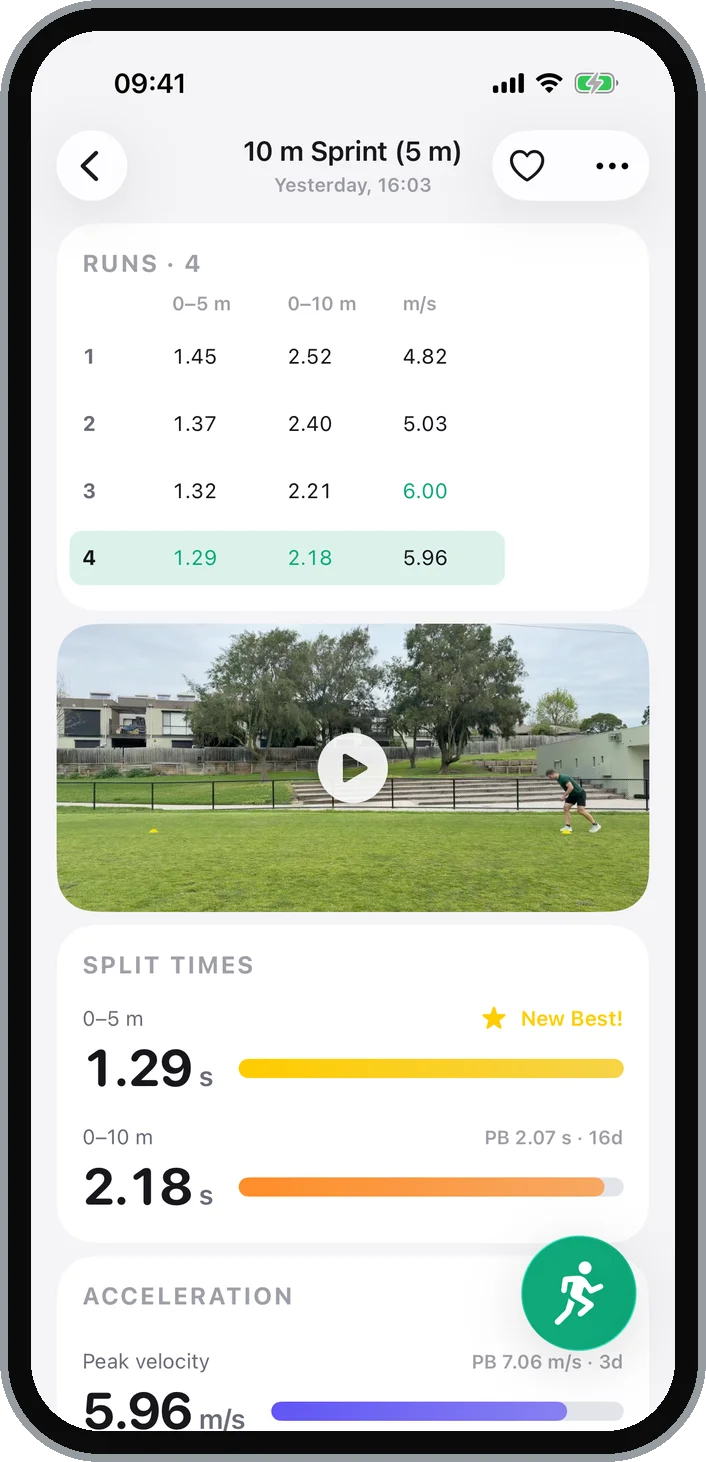
At the end you get every run in one table. In the session above, four 10 m sprints went from 1.45 s to 1.29 s over the first 5 m, and the last one set a new best. Tap any row to load that run’s video and numbers.
Agility test timing and turn checks
Metric Sprint runs six agility tests from the same phone:
- 5-0-5, from a standing start or flying
- 5-10-5 Pro Agility
- T-Test and Modified T-Test
- Lane Agility, the NBA combine drill run around the key
Each one loads with its own gates. You get the total time, every leg, and a speed trace with each turn marked so you can see acceleration and deceleration performance.

Anyone who has run agility testing knows the problem with correctly and efficiently adjudicating turns. An athlete plants a foot just short of the line, the time looks great, and someone has to decide whether the score counts or if it was a foul and needs re-running, all while the next athlete is already lining up.
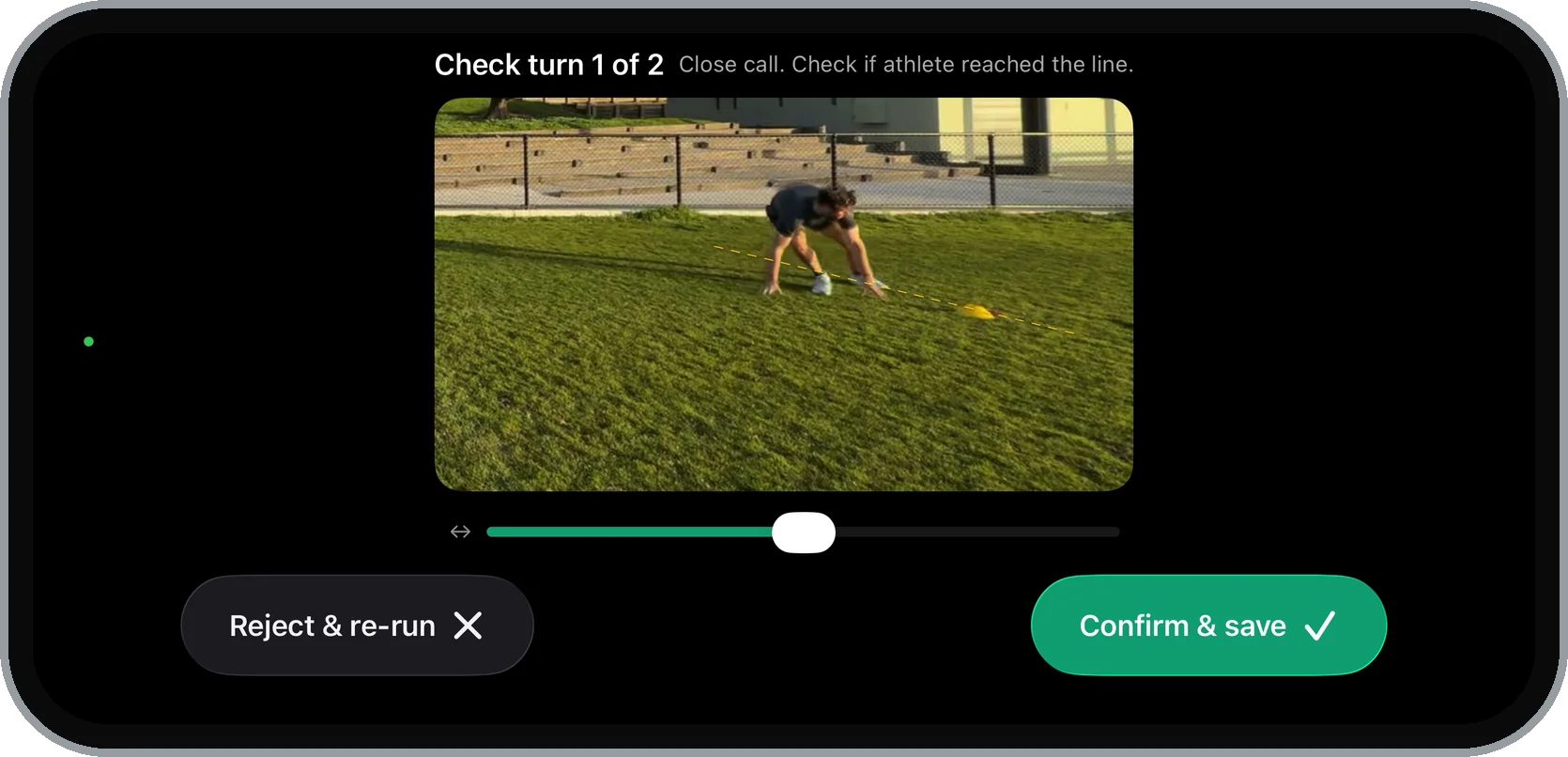
Metric Sprint checks every turn against the line for you. Clean, correct turns save automatically without stopping you. Close calls and missed lines bring up the turn verification screen for an instant review. Use the scrubber to step through a zoomed-in replay of each turn, so you can confirm it, or throw the run out and retest.
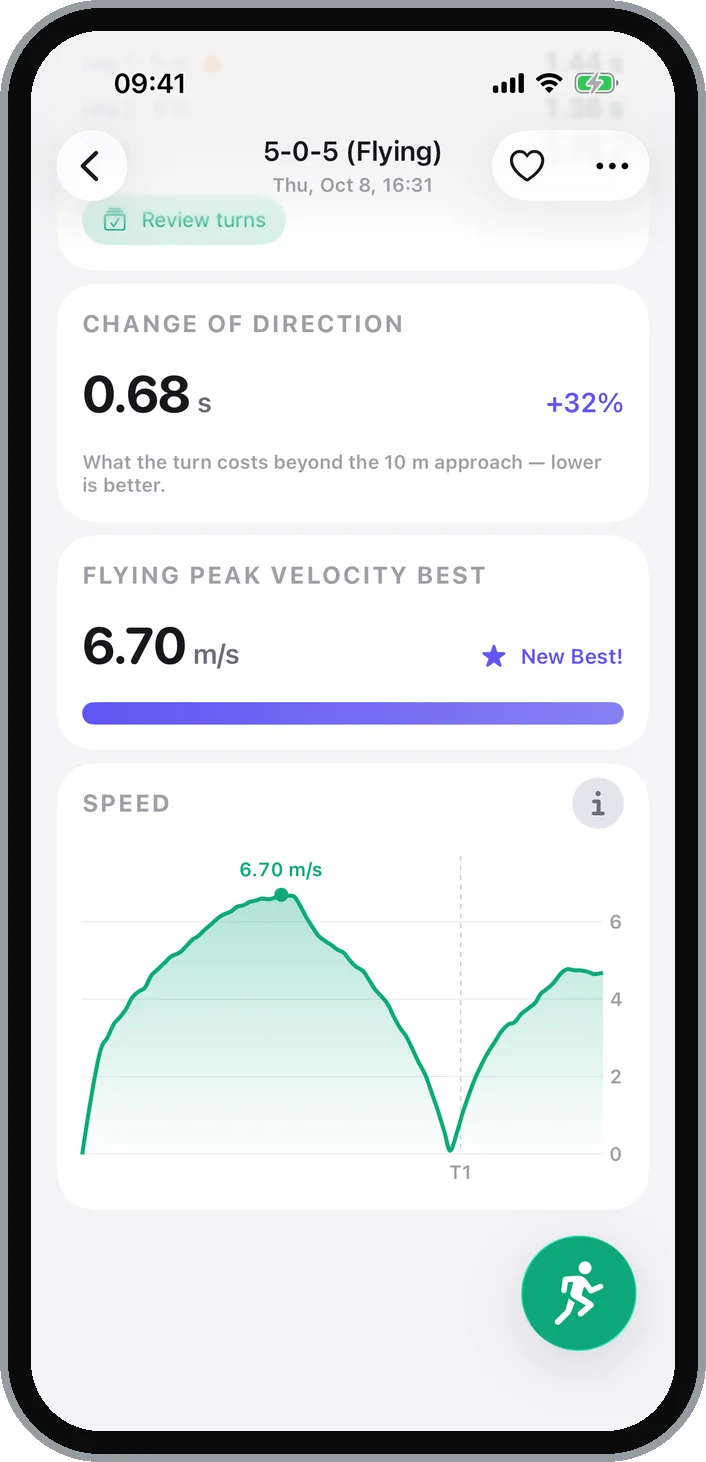
The flying 5-0-5 also gives you the change of direction deficit. It subtracts your 10 m approach time from your 5-0-5 time. The deficit shows how efficient your turn was relative to your maximum running speed. The lower the score, the better. Over time, your 10 m split and your 5-0-5 should both get faster, while the gap between them shrinks as your change-of-direction strength and skill improve.
The agility guide covers the setup for each test.
Track your sprint splits and personal bests
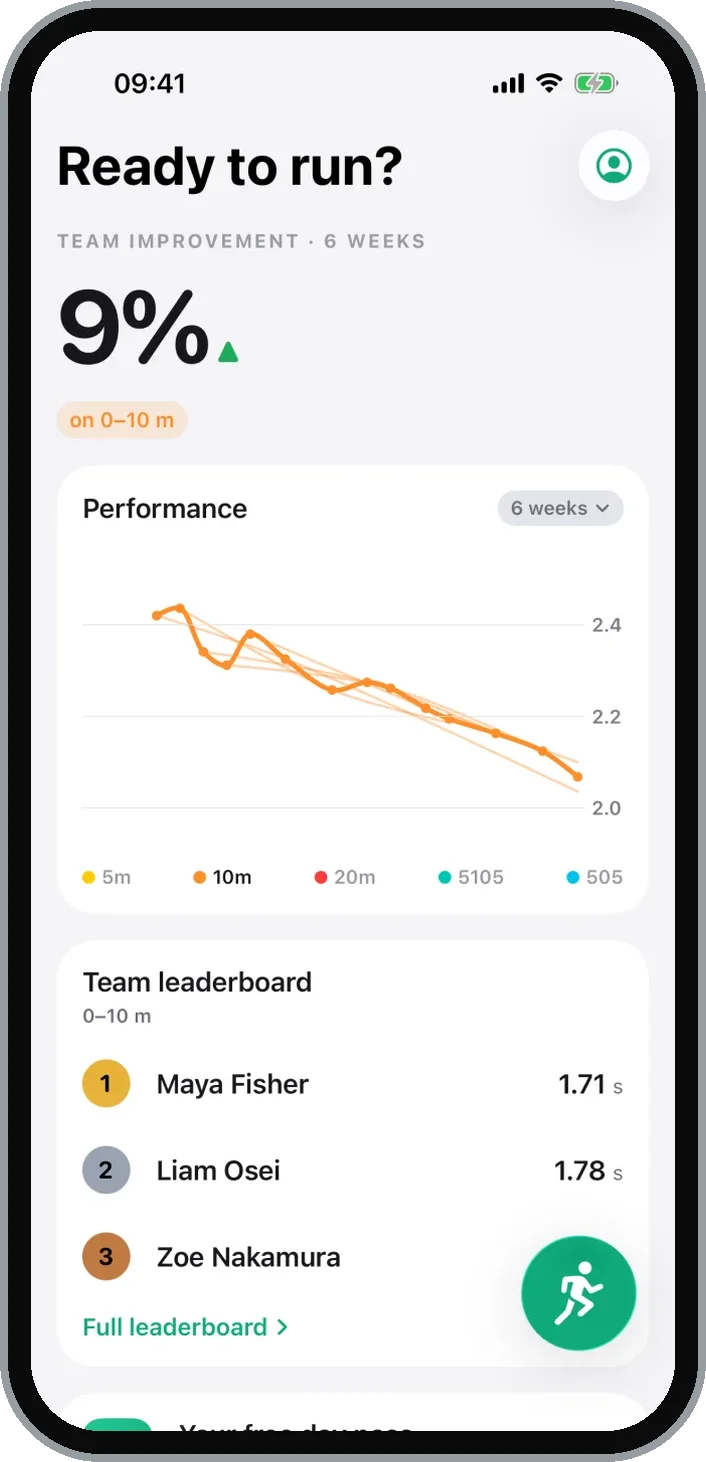
Metric Sprint keeps a personal record for every sprint split, every flying 10 m and 20 m effort, and every agility test, and shows each new result as a share of your best. The home screen of the Metric Sprint app charts your splits, peak velocity, or change of direction deficit, alongside a calendar view and your full training history. Peak velocity is plotted separately for each run distance, because top speed off a 10 m run and off a 30 m run are different numbers.
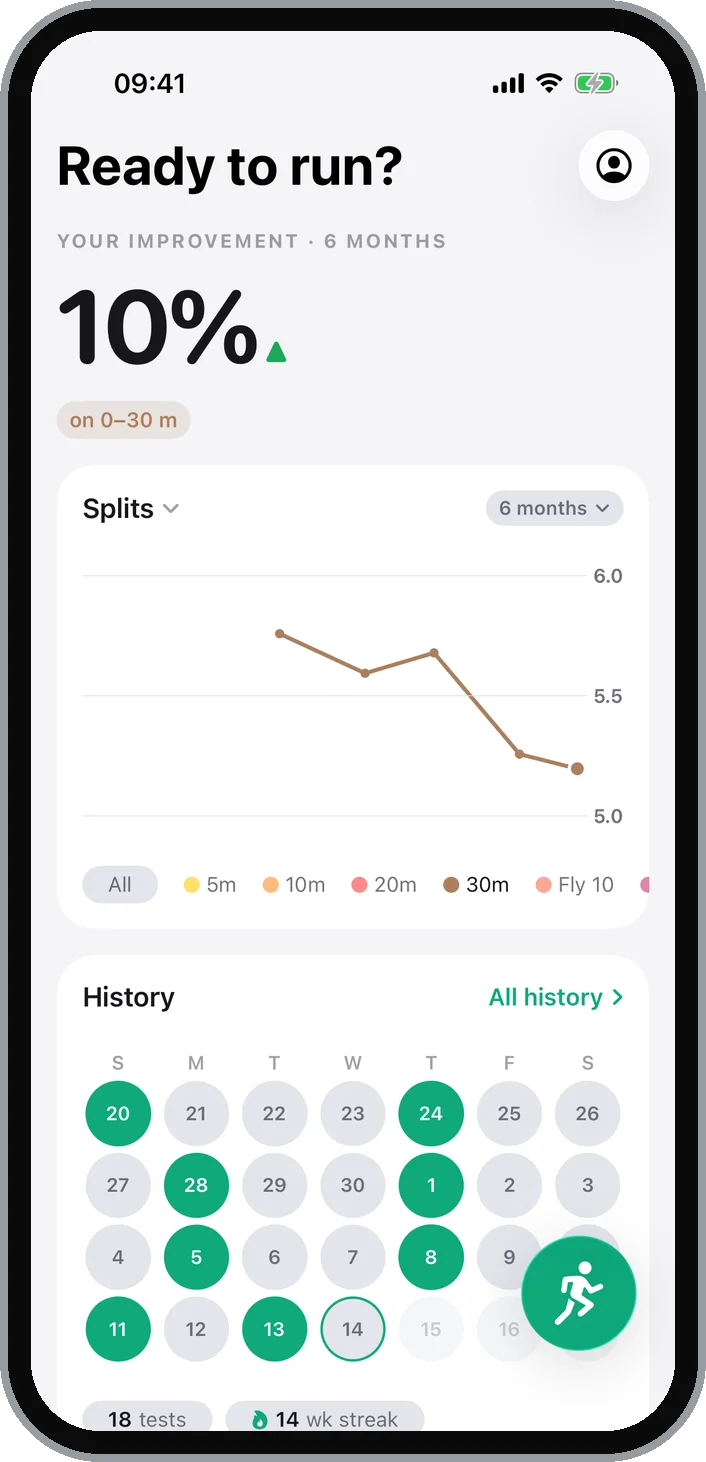
Each month in your history also opens with a recap: your test days, runs, distance covered at speed, and the records you set, ready to share as an image.
A sprint timing system for coaches and teams
Metric Sprint is suitable for both solo athletes looking to track their own training and coaches working with large groups. Coach Mode lets you test a whole squad from one phone. With Repeat runs turned on, coaches can rotate athletes as they walk to the line without leaving the capture screen, so the whole team gets tested quickly.
When you finish, the whole team’s runs come back as one summary table, where you can open any sprint to play it back or review the analysis. The home screen adds a leaderboard for whichever test you’re looking at, and every athlete gets a profile with their records and recent runs.
Your athletes can also run Metric Sprint on their own phones, with results coming straight back to you.
If you use more than one Metric app, Metric Ultra covers Pro in Lift, Jump, and Sprint under one plan. It adds the web dashboard at app.metric.coach, where you can build programs and review every athlete’s testing from your laptop.
Start timing your sprints with Metric
Metric Sprint is available on the App Store for iPhone and iPad. You can subscribe to Sprint Pro in-app, take out a day pass for 24 hours of unlimited testing, or get Metric Ultra here on our website for Pro access to all three Metric performance apps.
Start with how to record a sprint, or see the Metric Sprint page for the full rundown. To find the plan that suits you, see plans and pricing. I’ll be out at the field, working on my top-speed mechanics.